Snes9x EX+
- 4.2
- Rating
- 10.00M
- Installs
- Free
- Price

 Analysis by App-foxy
I approached Snes9x EX+ as a practical way to revisit Super Nintendo games rather than as a conventional arcade release. It is an emulator from Robert Broglia, available for free, and its purpose is straightforward: it lets a compatible Android device run SNES software. That simplicity is its biggest attraction. Instead of asking me to learn a new control system or adapt to a new art style, it gives the original games room to speak for themselves.
My first impression was that the app is more about access and flexibility than presentation. The interface is functional, and the experience depends heavily on the game I choose to load. That means the quality of the art, sound, setting, and pacing comes from the original SNES library, while the emulator’s job is to make those elements playable on a modern touchscreen. When it works well, the result feels surprisingly direct: select a game, adjust the controls, and settle into a small piece of console history.
It is listed in the arcade category, although that label only partly describes the experience. Some SNES games are fast arcade-style challenges, while others are role-playing adventures, platformers, racing games, puzzles, or action titles. I would therefore see it less as one game and more as a compact tool for exploring a broad era of console design. Its store summary identifies it as an SNES emulator, and that is exactly the right expectation to bring to it.
You May Also Like

 Blood Strike: 2.5 Anniversary
Blood Strike’s Loadouts Turn Every Drop Into a Tactical Gamble
A close look at Blood Strike’s custom loadouts: how fast access to signature weapons reshapes its battle royale rhythm, rewards preparation, and narrows the gap between fights.

 Pandora - Music & Podcasts
Pandora’s Music Is Easy to Start, but Harder to Recover
Pandora’s strength is its low-effort path from a seed to a station. Its weak spot is how much confidence it asks you to place in connection, setup, and quiet recovery.

 8 Ball Pool
 Is Built on Rivalries, Rematches, and Routine
A close look at the rivalries, rematches, shared routines, and unanswered safety questions that turn a quick pool match into a persistent mobile community.

 Samsung Music
’s Quiet Strength Is Playing What You Already Own
Its reach comes less from spectacle than from dependable access to a personal library. That simplicity is both the app’s strongest retention engine and its ceiling.

 AccuWeather: Weather Radar
AccuWeather Review: A Quick, Clear Forecast for Everyday Decisions
For everyday plans, the best forecast is the one you can understand quickly. AccuWeather makes rain timing, radar, and local conditions easy to act on, with a few trade-offs.

 Hill Climb Racing
Why Hill Climb Racing Still Turns Crashes Into One More Run
A tiny car, a bumpy hill and one more upgrade: Hill Climb Racing keeps resurfacing because its simple chaos makes every near-miss feel personal.
More From Our News Desk



How the original worlds come through on a phone
The most interesting part of using an emulator is noticing how much personality older games created with very little visual space. SNES art direction often relies on strong silhouettes, carefully chosen colors, repeated patterns, and expressive animation rather than detailed realism. On a phone screen, those choices can remain readable because the original games were designed around clear visual communication. A character’s position, an enemy’s movement, or a platform’s edge usually has a deliberate visual purpose.
That clarity also makes the app a useful window into how different studios handled setting. A fantasy game may use layered backgrounds and warm colors to suggest a welcoming village, then shift toward darker tones for danger. A science-fiction title may use mechanical shapes, cool palettes, and scrolling scenery to create a sense of motion. Because Snes9x EX+ does not impose a single visual identity, the atmosphere changes from one game to another, but the emulator lets those contrasts sit side by side.
I found that the display size matters more than I expected. On a larger phone, pixel art can feel comfortably readable, while a smaller screen may make menus and fine details harder to distinguish. Stretching the image can make it fill the display, but it may also make the picture feel less faithful to the original proportions. Keeping a more traditional shape can preserve the intended look, although it may leave unused space around the image. This is a genuine trade-off rather than a flaw with one universal solution.
For someone interested in retro game design, that choice is valuable. I can compare how a platformer communicates jump timing with how a role-playing game uses a map, dialogue box, or character portrait. The emulator becomes a kind of portable study desk for older visual language. It is not only about nostalgia; it also shows how developers created strong moods with limited hardware and strict visual constraints.
My practical advice is to choose the display arrangement game by game instead of assuming one setting will suit everything. Fast action benefits from a clean, stable image where moving objects remain easy to track. A slower adventure may be more comfortable with a larger picture, even if that means accepting some scaling. Taking a moment to adjust the presentation can make the difference between feeling immersed and feeling as though I am looking at a cramped software window.
Why the setting still matters when the screen is small
Playing on a phone changes the relationship with the original setting. A console game once occupied a television and encouraged a shared living-room experience. Here, I can play during a commute, in a waiting room, or for a short break at home. That convenience is useful, but it can also make an expansive adventure feel fragmented. A game built around long exploration sessions may lose some of its sense of place if I repeatedly stop after a few minutes.
That is why I think the app suits games with clear short-term goals especially well. An arcade challenge, a single platforming stage, or a quick racing session can fit naturally into mobile use. Longer role-playing games still work, but I get more from them when I reserve a calmer period and allow the setting to develop. The emulator makes both approaches possible; the better choice depends on the structure of the game being played.
There is also a useful contrast between original difficulty and modern convenience. Older games often expect attention, repetition, and memorization. Their visual design may be simple, but their worlds can be demanding. A phone makes access easier, yet it does not automatically make the underlying game more forgiving. I appreciate that tension because it preserves the character of the original experience while allowing me to play it in a more flexible place.
Sound, rhythm, and the feeling of play
SNES soundtracks are a major part of the mood, and emulation makes that especially noticeable through headphones. Melodies often carry information that the visuals only suggest: a town theme can slow my pace, a battle cue can prepare me for pressure, and a repeated stage track can turn failure into a familiar rhythm. When the sound is clear and the controls respond properly, the phone stops feeling like a generic screen and starts feeling like a small dedicated game system.
The rhythm of an individual game also determines whether mobile play feels natural. Action titles tend to communicate their tempo through short musical phrases, enemy patterns, and tightly repeated attempts. Puzzle games may use sound to mark successful decisions and mistakes, giving each move a small sense of consequence. Adventure games often alternate between quiet exploration and more urgent encounters. Snes9x EX+ does not create these rhythms, but it makes them available without requiring the original console.
I recommend using headphones when the environment allows it, particularly for games that depend on musical transitions or subtle sound effects. The phone’s speaker can be convenient, but it may flatten the difference between a soft exploration theme and a louder action sequence. Headphones also make the experience feel more private, which suits the app’s portable nature. On the other hand, playing quietly in a shared space is one of the reasons to use a phone in the first place, so I see this as a preference rather than a requirement.
One limitation is that the emotional effect of the soundtrack depends on the condition of the original software and the device running it. If the game does not display or respond as expected, the mood breaks immediately. A beautiful background or memorable melody cannot compensate for controls that feel late or inconsistent. I therefore judge the app less by whether it adds atmosphere and more by whether it stays out of the way of the atmosphere already built into each game.
That is also where pacing becomes important. A slow game can expose every interruption, menu delay, or awkward control placement because it depends on sustained attention. A fast game may hide small inconveniences during a short session but make them obvious after repeated attempts. I found that the best results come from matching the game to the moment: quick arcade-style play during a brief break, and story-heavy exploration when I can give the soundtrack and setting proper attention.
Controls and the practical fit for everyday play
Touchscreen controls are the central compromise. Physical SNES controllers were built around tactile buttons that could be pressed without looking. A phone screen cannot provide the same certainty, so games requiring rapid combinations, diagonal movement, or precise timing may take longer to feel comfortable. I can adapt, but the adaptation is part of the experience, and it may be frustrating if I expect the same confidence I would have with a real controller.
For slower games, menus, turn-based battles, exploration, and many puzzle systems, touch controls can be perfectly workable. The screen gives me a direct visual reference for where each virtual button is located, and I can play without carrying extra hardware. For demanding platformers or fighting games, the situation is more personal. Some players will adjust quickly, while others will find that the lack of physical feedback undermines the entire point of replaying the game.
I would not choose this app solely because I want the most precise possible control over difficult action games. A physical controller paired with a compatible device may be a better option for that purpose, assuming the necessary hardware and setup are convenient. The emulator remains useful in that arrangement, but its strongest advantage is portability, not replacing every part of a traditional console setup.
A realistic everyday scenario shows where it fits best. If I have a short train journey, I can use the app for a few attempts at a stage or a brief puzzle session. I do not need to prepare a television, find a console, or commit to a long evening. If I am playing a game with a large world and frequent story scenes, I might instead wait until I am at home and have enough uninterrupted time to remember where I was and why I was exploring a particular area.
Another useful habit is to treat saving as part of the session plan. I prefer to pause at a sensible point rather than closing the app in the middle of an important sequence and assuming everything will resume exactly as I expect. A deliberate save-and-exit routine reduces the chance of losing progress and makes short mobile sessions less stressful. This is particularly helpful with older games, whose original saving expectations may not match modern mobile habits.
Storage and organization also matter once I use the emulator regularly. A small collection is easy to manage, but a large library can turn the app into a cluttered launcher. I get more enjoyment when I decide which games I actually want to play instead of treating every available file as an obligation. Organizing a focused selection by genre or current interest makes it easier to start playing and keeps the experience from becoming a search exercise.
Users should also think about where their game files come from. The emulator is software for running SNES games, but the legal right to use individual games depends on ownership and local law. I would keep that responsibility separate from judging the application itself. The sensible approach is to use games I am entitled to use and avoid treating the availability of an emulator as permission to copy a commercial library.
Who gets the most from it
I think Snes9x EX+ is a strong fit for people who already know which SNES games they want to revisit. It is also useful for curious players who enjoy comparing older genres, art styles, and soundtracks without buying a classic console setup. The free price lowers the barrier to trying the emulator, and the Everyone age rating makes it approachable for a broad audience, although the content of individual games can still vary in tone and difficulty.
The app is less suitable for someone seeking a modern arcade game with built-in content, achievements, or a unified progression system. It does not provide one carefully curated world with a single visual direction. Its appeal comes from the variety of the original library, which also means the experience can feel inconsistent. One game may look and sound wonderful while another may expose the limitations of its era or feel awkward with touch controls.
I would also hesitate to recommend it to a player who dislikes setup. An emulator requires more personal decisions than a normal mobile game: choosing software, arranging the display, learning the controls, and deciding how to manage saves. None of these steps is necessarily difficult, but they are part of the package. If I want to tap an icon and immediately enter a polished new game, a dedicated modern release will probably be more satisfying.
Its audience size suggests that the concept has broad appeal: the app has passed ten million installs, carries an average rating of 4.2 from roughly one hundred fifteen thousand ratings, and has accumulated about five thousand eight hundred written reviews. Those figures do not replace personal testing, but they do show that this is not an obscure experiment. I see it as an established choice for Android users who want SNES emulation in a portable form.
My atmosphere verdict after living with the emulator
The current version is 1.5.85, and the app supports Android from version 2.3 onward, which gives it an unusually broad device range. That older minimum requirement is relevant for anyone using a dated phone or tablet, although the quality of the experience will still depend on the particular hardware, screen, and controls. The wide compatibility makes the app practical for more than just recent flagship devices.
What I value most is the way it preserves the contrast between different kinds of SNES mood. A bright platforming stage, a tense dungeon, a lonely science-fiction landscape, and a cheerful town can all exist within the same app because the original games supply their own art direction and sound. The emulator’s restraint is a strength: it does not try to repaint those worlds or turn them into a single branded experience.
The trade-off is that the app cannot solve every problem created by moving console games to a touchscreen. Precise action may feel less dependable, long sessions can be tiring, and the best display arrangement varies by game. Some users will also prefer a physical controller or a larger screen. Those are not reasons to dismiss it, but they are important when deciding whether portability matters more than tactile accuracy.
For me, the best use is selective and intentional. I choose a game that suits the amount of time I have, adjust the screen before starting, use headphones when I want the soundtrack to carry the mood, and save carefully before ending a session. Those small choices help the original pacing survive the move to mobile. Without them, the app can feel like a technical utility; with them, it becomes a convincing way to reconnect with older game worlds.
My recommendation is clear for Android players who want a free SNES emulator and are comfortable with a little setup. I would recommend it less strongly to anyone who expects modern touch controls, a single polished campaign, or an all-in-one entertainment package. Snes9x EX+ is at its best when I treat it as a doorway to carefully chosen games, not as a replacement for every console experience. In that role, Robert Broglia’s app keeps the visual language, sound, and pacing of classic SNES design close at hand while remaining honest about the compromises of playing on a phone.
FAQs for Snes9x EX+
01What is Snes9x EX+ and what can it do?
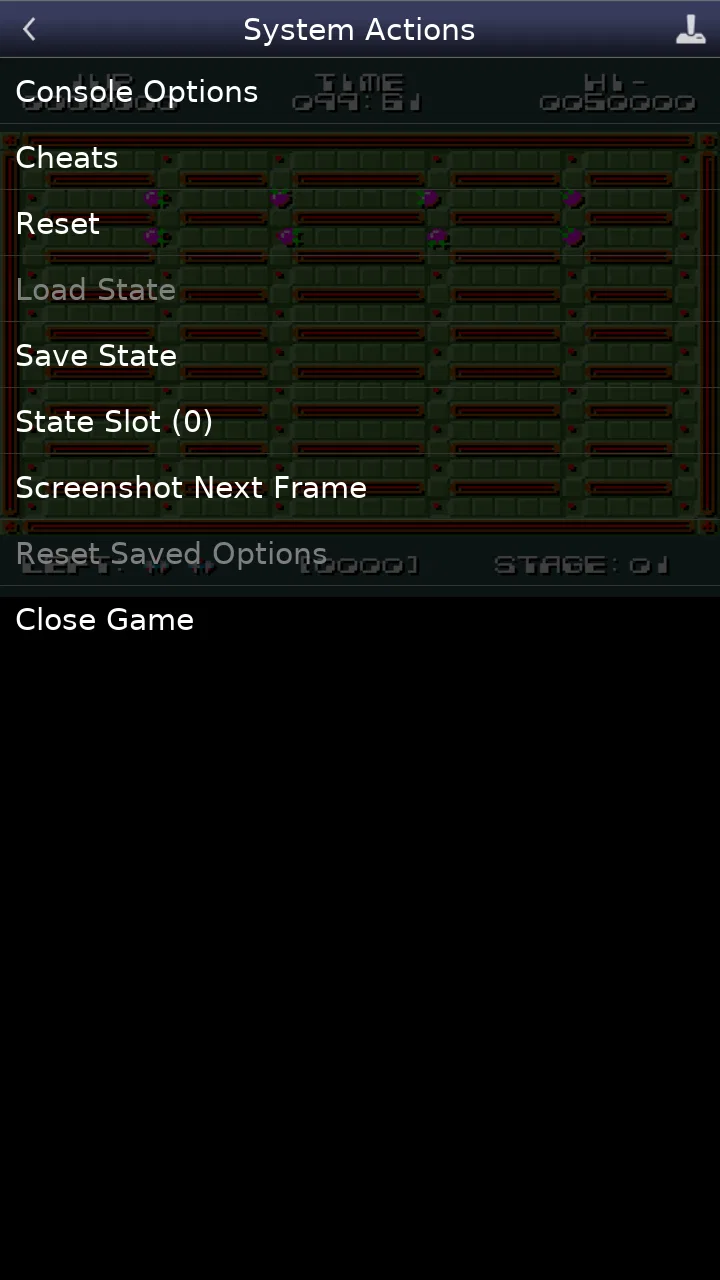
Snes9x EX+ is an Android emulator designed to run games originally released for the Super Nintendo Entertainment System. After testing its main features, it provides accurate emulation, customizable on-screen controls, support for external controllers, save states, cheats, and several display options. It is intended for users who legally own the games and want to play their personal backups on a mobile device.
02Does Snes9x EX+ include Super Nintendo games?
No. Snes9x EX+ does not include commercial Super Nintendo games, and it is not a game store. You must provide your own legally obtained ROM files and load them through the app. The emulator may include or support homebrew content, but downloading copyrighted ROMs from unauthorized websites can violate copyright laws. Always check the regulations in your country and use backups you are legally allowed to possess.
03How well does Snes9x EX+ perform on Android devices?
Performance is generally very good, even on many older or budget Android phones and tablets. During use, games typically load quickly and run smoothly when compatible ROMs are used. Performance can still vary depending on the device, Android version, game, graphics settings, and background applications. If you experience slowdown, reducing visual enhancements or closing other apps may improve stability and battery life.
04Can I use a physical controller with Snes9x EX+?
Yes. Snes9x EX+ supports external input devices, including many Bluetooth and USB game controllers that Android recognizes correctly. You can also customize the touchscreen layout, button positions, and control settings for more comfortable handheld play. Controller compatibility depends on the device and Android version, so checking button mapping before starting a long game session is recommended.
05Does Snes9x EX+ support save states and multiplayer?
Snes9x EX+ includes practical save features such as normal in-game saving and quick save states, allowing you to save progress almost anywhere and resume later. It also offers options related to multiplayer and input configuration, although the exact experience depends on the game, device, and connection method. Save-state files should be backed up before changing devices or reinstalling the application.
Pros
- Accurate SNES emulation with smooth performance on many Android devices.
- Supports save states
- making it easy to pause and resume progress.
- Customizable on-screen controls improve playability on touchscreens.
- Works with physical controllers for a more authentic gaming experience.
- Includes useful features such as cheat support and screen filters.
Cons
- Requires legally obtained ROM files; games are not included with the app.
- Touch controls can feel cramped during fast-paced platforming or action games.
- The interface looks dated and may take time to navigate comfortably.
- Some advanced settings may be confusing for users new to emulators.
- Compatibility and performance can vary across older or less powerful devices.

Snes9x EX+
Gallery